
Installation
Il sera supposé que la machine virtuelle Java est déjà installée sur la machine cible et que l’exécutable java est accessible depuis le PATH système.
Basique : outils en ligne de commande
La distribution de l’application se présente sous la forme d’une archive au format .tar.gz. Une fois l’archive copiée sur la machine cible, il faut la décompresser – de préférence dans un répertoire protégé du système afin d’éviter qu’il soit modifiable par les utilisateurs :
root:~ # cd /usr/lib
root:lib # tar zxvf /tmp/apiwatch-1.0.tar.gz
apiwatch-1.0/lib/apiwatch-core-1.0.jar
apiwatch-1.0/lib/antlr-runtime-3.3.jar
...
apiwatch-1.0/lib/apiwatch-rules-base-1.0.jar
apiwatch-1.0/war/apiwatch-war-1.0.war
apiwatch-1.0/conf/rules-config.ini
...
apiwatch-1.0/bin/apiwatch
apiwatch-1.0/bin/apidiff
apiwatch-1.0/bin/apiscan
Il est recommandé d’ajouter le chemin /usr/lib/apiwatch-1.0/bin au PATH système pour que les exécutables apiwatch, apidiff et apiscan soient accessibles facilement. La commande suivante permet de vérifier que les outils en ligne de commande ont été correctement installés :
root:~ # apiwatch --help
usage: apiwatch [-h] [-e ENCODING] [-x PATTERN [PATTERN ...]]
                [-i PATTERN [PATTERN ...]] [-u USERNAME] [-p PASSWORD]
                [-v {TRACE,DEBUG,INFO,WARN,ERROR}] [-f {text,json}]
                [-r RULES_CONFIG] [-s {INFO,MINOR,MAJOR,CRITICAL,BLOCKER}]
                REFERENCE FILE_OR_DIR [FILE_OR_DIR ...]

APIWATCH version 1.0

...
Optional: storage server
To install the web application in the application server, you must uncompress the /usr/lib/apiwatch-1.0/war/apiwatch-war-1.0.war file in a webapps/apiwatch/ directory of the Tomcat server, then restart this server so that it considers the presence of the new webapp.
root:~ # cd /var/lib/tomcat-6/webapps
root:webapps # unzip /usr/lib/apiwatch-1.0/war/*.war -d apiwatch
Archive:  /usr/lib/apiwatch-1.0/war/apiwatch-war-1.0.war
 creating: apiwatch/META-INF/
 inflating: apiwatch/META-INF/MANIFEST.MF
...
root:webapps # service tomcat-6 restart
 * Stopping tomcat-6 ...   [ ok ]
 * Starting tomcat-6 ...   [ ok ]
The APIWatch webapp should be accessible at http://localhost:8080/apiwatch/. On the next figure we can see a screenshot of the homepage (no component has been analysed still).
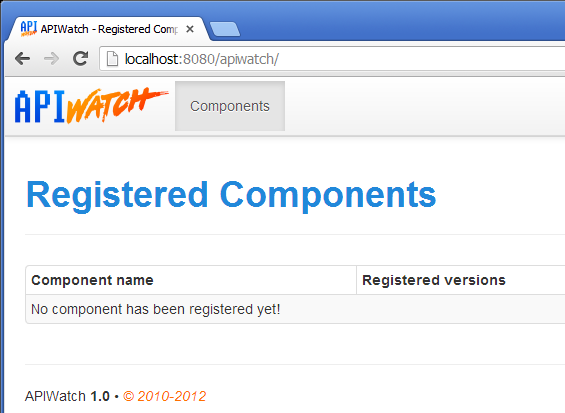
Homepage of the webapp after first start