
Source Code Analysis
Simple source code analysis is done with the apiscan tool. This tool can store the results of an analysis in a file or in an APIWatch server.
Here, we wish to analyse the API exposed by the source code of a component called jenkins-core, for two different versions of it: 1.447 and 1.466. All apiscan calls will be made from a directory containing all the source code files.
Here is the command used to recursively analyse the content of the working directory. The -o/--output option is used to specify the place where we wish to store the result of the analysis. Here we gave the URL of an APIWatch server but we can provide a directory path as well, and then the result will be stored in <directory>/api.json. If -o/--output option is omitted, then then result is sent to standard output:
user:src $ apiscan * -o http://localhost:8080/apiwatch/jenkins-core/1.447/
[INFO] Sent results to URL: http://localhost:8080/apiwatch/jenkins-core/1.447/
When we choose to send the result to an APIWatch server, we have to specify an URI formatted this way [1]:
<Application base URL>/<Component name>/<version>
On next figure we can see the homepage after having analysed two versions of the jenkins-core component:
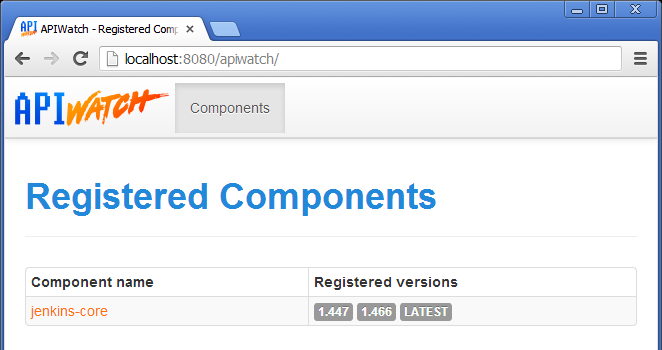
Homepage after analysis of two jenkins-core versions
By clicking on the component name, we have access to details about its different analysed versions:
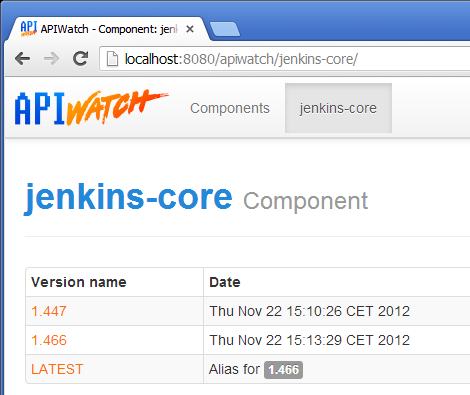
Versions of a software component
By clicking on the name of one of the versions, we can visualise analysed API data:
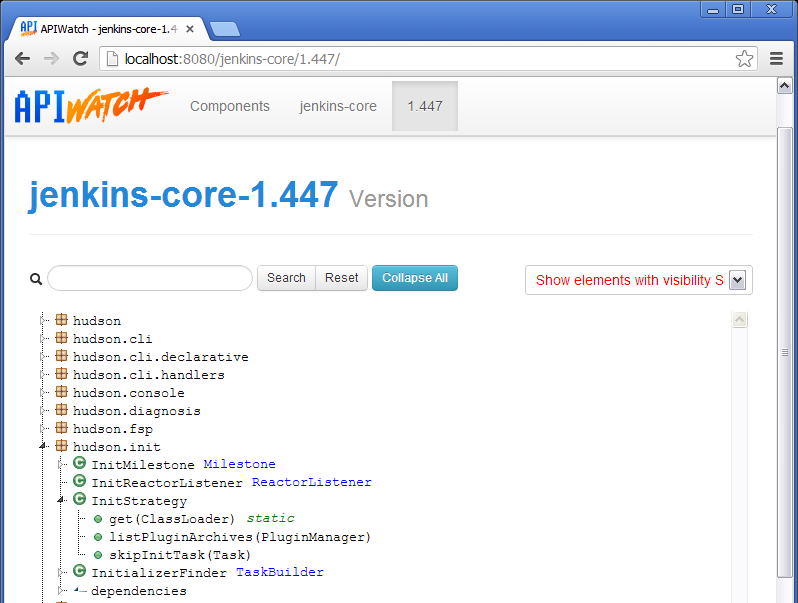
API data for one version
Icons used on the previous figure map to objects of the API model described in chapter 3.2.1. Some of the icons are decorated depending on the visibility of the element they represent. The icon or decoration color informs about the visibility (red for PRIVATE, yellow for PROTECTED, blue for SCOPE). If the icon is green or not decorated, the visibility of the element is PUBLIC:
| Icons | Object |
|---|---|
    |
APIScope |
    |
ComplexType |
    |
Function |
    |
Variable |
    |
SimpleType |
 |
Dependency |
Note
On this page, we can filter the elements we wish to show by several criteria:
- Their name with the research field
- Their visibility with the top-right combo-box
Footnotes
| [1] | If a version is already stored on the server, it will not be possible to overwrite it. |